The header and footer builder
Sidebar → Online Store → Design → Headers (or Footers).
Both lists work the same way: each row shows a name, whether it is the Default, its status and when it changed, with Edit, Set as default / Remove default and Delete on the row. The one marked Default is what every page uses unless a page overrides it in page settings.
The editors are the same three columns as the page builder — a structure list on the left, a live preview in the middle, settings on the right — with the same undo, device toggle and unsaved-changes guard.
The header: three stacked bars
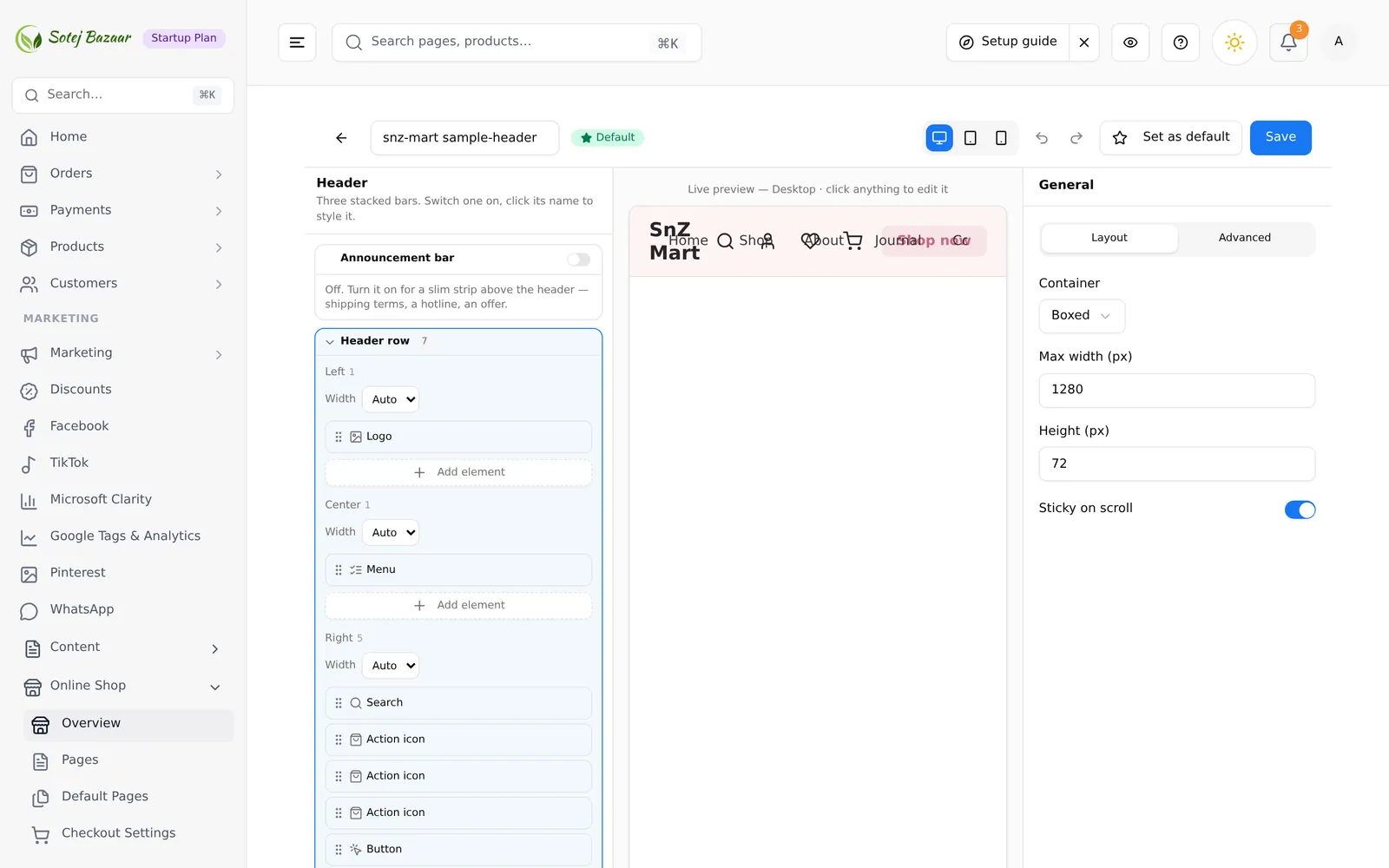
A header is three bars, top to bottom. Each has its own on/off switch, and clicking a bar’s title opens that bar’s settings on the right.
| Bar | Default | For |
|---|---|---|
| Announcement bar | Off | A slim strip above the header — a hotline, an offer, shipping terms |
| Header row | Always on | Logo, menu, search, account and cart |
| Second row | Off | The navigation menu on its own line under the header |
Off bars say so: “Off. Turn it on for a slim strip above the header — shipping terms, a hotline, an offer.”
Zones
Each bar has three zones — Left, Center, Right — and each zone is a list you add elements to. Add element opens the same gallery the page builder uses. Elements drag within a zone, and each zone header carries a Width control: Auto (share the space), % or px (pin it). Mixing units is fine — a 200px logo column beside a 50% menu column is normal.
Percentages are not checked against a total of 100; the preview shows immediately if you over-allocate.
Header elements
| Element | What it is |
|---|---|
| Row | A grid of 1–4 columns you can drop any other element into |
| Logo | Your shop name as text, or an uploaded logo image |
| Menu | A row of navigation links, typed in or pulled from a shop menu |
| Hamburger | A button that slides a drawer of links in from the left or right; it can show on desktop too |
| Search | Product search — an icon, a full bar, or a bar with a category dropdown |
| Button | A call-to-action button in solid, outline, pill or text style |
| Text | A short line — a shipping promise, an offer |
| Text link | A single text link |
| Icon link | An icon that links somewhere — account, wishlist, cart, search, phone |
| Action | The live account, wishlist or cart icon, with its counter |
| Phone | A tap-to-call phone number |
| Image | Any image, optionally linked — payment badges, a small banner |
| Hero | A full-width banner: background image, heading, subheading, buttons |
| Services | A row of icon + title + description cards |
| Testimonials | Customer quotes with author, role and a star rating |
| Stats | Big numbers with labels |
| CTA band | A full-width strip with heading, text and one button |
| Banners | A grid of promotional images, each optionally linked |
| Image slider | A rotating set of images with optional autoplay and arrows |
| Logo strip | A horizontal row of partner or payment logos |
Action and Icon link look alike and are not the same: Action is the live cart or wishlist with its counter, Icon link just goes somewhere.
Announcement bar elements
| Element | What it is |
|---|---|
| Text | A single message, optionally linked, bolded or animated |
| Rotate | Several messages that cycle in place |
| Marquee | A message that scrolls continuously across the bar |
| Phone | A tap-to-call number with an optional label |
| Social | Links to your social profiles as icons |
Bar settings
Click a bar’s title to style the bar itself.
Header row — Container and Max width (px), Height (px), Sticky on scroll, Background, Text / icon color, Bottom border.
Announcement bar — Height (compact / normal / tall), Sticky on scroll, Background, Text color.
Second row — Height (px), Divider above, Background, Text / icon color.
The footer: a grid of columns
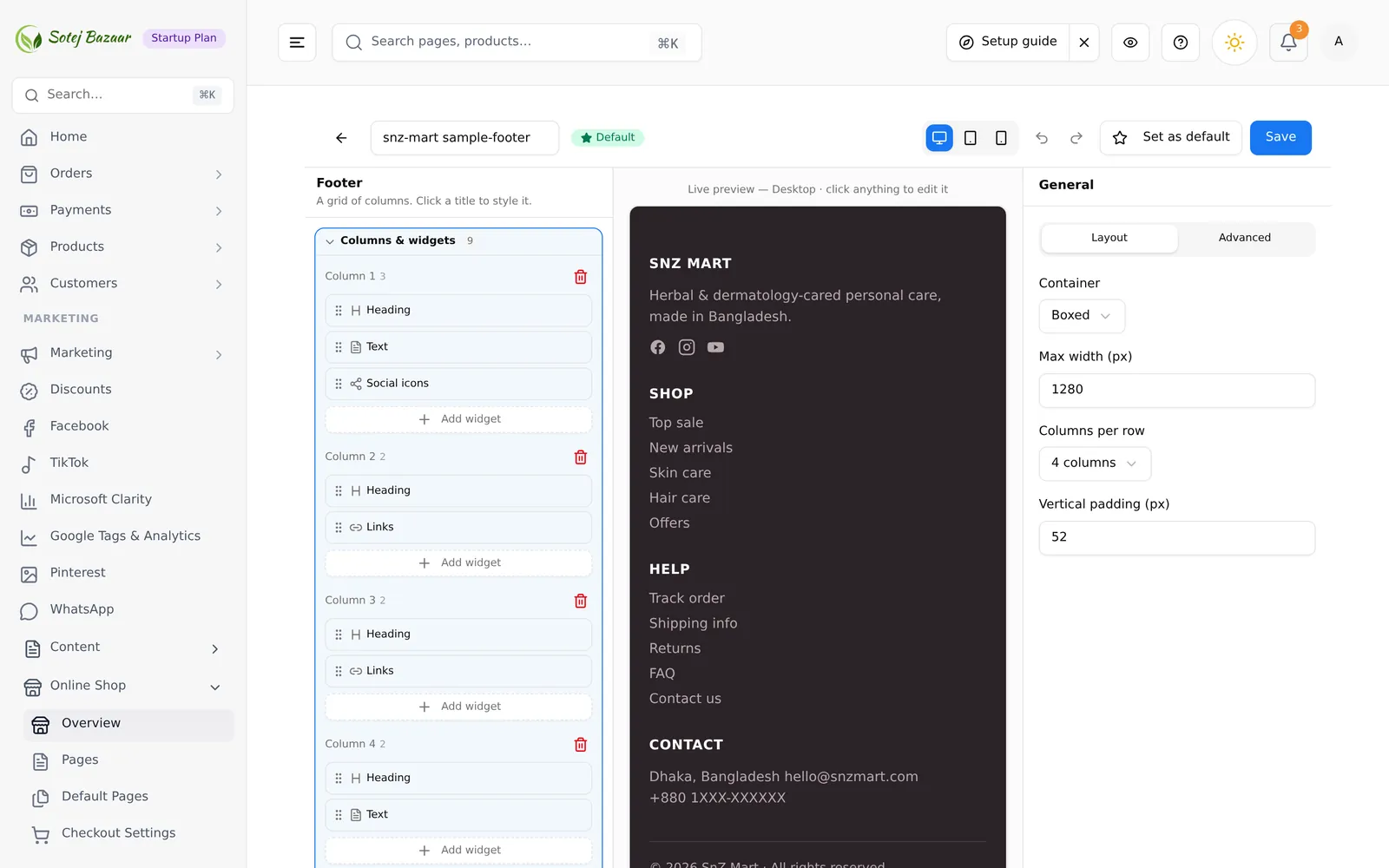
A footer is columns of widgets, plus a bottom bar. Add column creates a column; each column takes its own widgets and can be deleted. Bottom bar is the copyright line under the columns — “Click the title to edit it.”
Footer widgets
| Widget | What it is |
|---|---|
| Row | A grid of columns you can drop any other footer widget into |
| Heading | A column title |
| Text | A paragraph — an about blurb, an address |
| Links | A list of links you type in |
| Menu | A list of links, typed in or pulled from a shop menu |
| Image | An image, optionally linked — a logo, payment badges |
| Newsletter | An email sign-up form with a title and a button |
| Social | Links to your social profiles as icons |
| HTML | Raw HTML, for anything the other widgets do not cover |
Footer settings
Container and Max width (px), Columns per row, Vertical padding (px), Background, Text color, Muted text, and the Copyright text on the bottom bar.
Menus
Header and footer Menu elements can either hold links you type in, or point at a menu you built in Menu Builder — change the menu once and every place that uses it follows. See menus, headers & footers.
Saving, and making one the default
Save stores the header or footer. Set as default header for all pages makes it the one your storefront uses. A single page can still override it in page settings.
Headers from the old builder
A header built with the previous builder has compiled HTML but no settings these controls can read. Opening it warns you:
This header was built with the old builder, so its design can’t be loaded into these controls. Saving now REPLACES it with the header shown in the editor controls. Your original header will be lost. Continue?
Leave without saving if you want to keep it. If you do continue, rebuild the header here before saving — what you see in the editor is what replaces it.
Common problems
“My menu is not in the list.” Build it first in Menu Builder, then pick it in the element.
“The cart icon shows no number.” Use the Action element, not Icon link.
“Everything is squashed into the left.” Check the zone Width settings — a pinned percentage on one zone leaves less for the others.
“I changed the header but the shop still shows the old one.” Either you did not press Save, or this header is not the default — check the list, or the page’s own header override.