Marketing & discounts
Discount codes, campaigns, and the tracking tools that tell you which advertising is working.
Where to find it
Sidebar → Marketing.
| Menu item | What it’s for |
|---|---|
| Marketing → Overview | Sales figures and recent campaigns |
| Marketing → Campaigns | Time-limited discount campaigns |
| Discounts | Coupons, automatic discounts and free delivery |
| SEO | How your pages will show on Google — see SEO check & SEO health |
| Ads & Tracking → Facebook, TikTok, Google Tags & Analytics, Pinterest, Microsoft Clarity | Advertising and tracking apps |
| Customer Chat → WhatsApp, OmniConva | Chat with customers |
Two items in this menu — Automations and Attribution — are marked Coming Soon and do nothing yet. There is no setup to do and nothing behind them.
Discounts
Sidebar → Marketing → Discounts. This is where most of your marketing work happens.
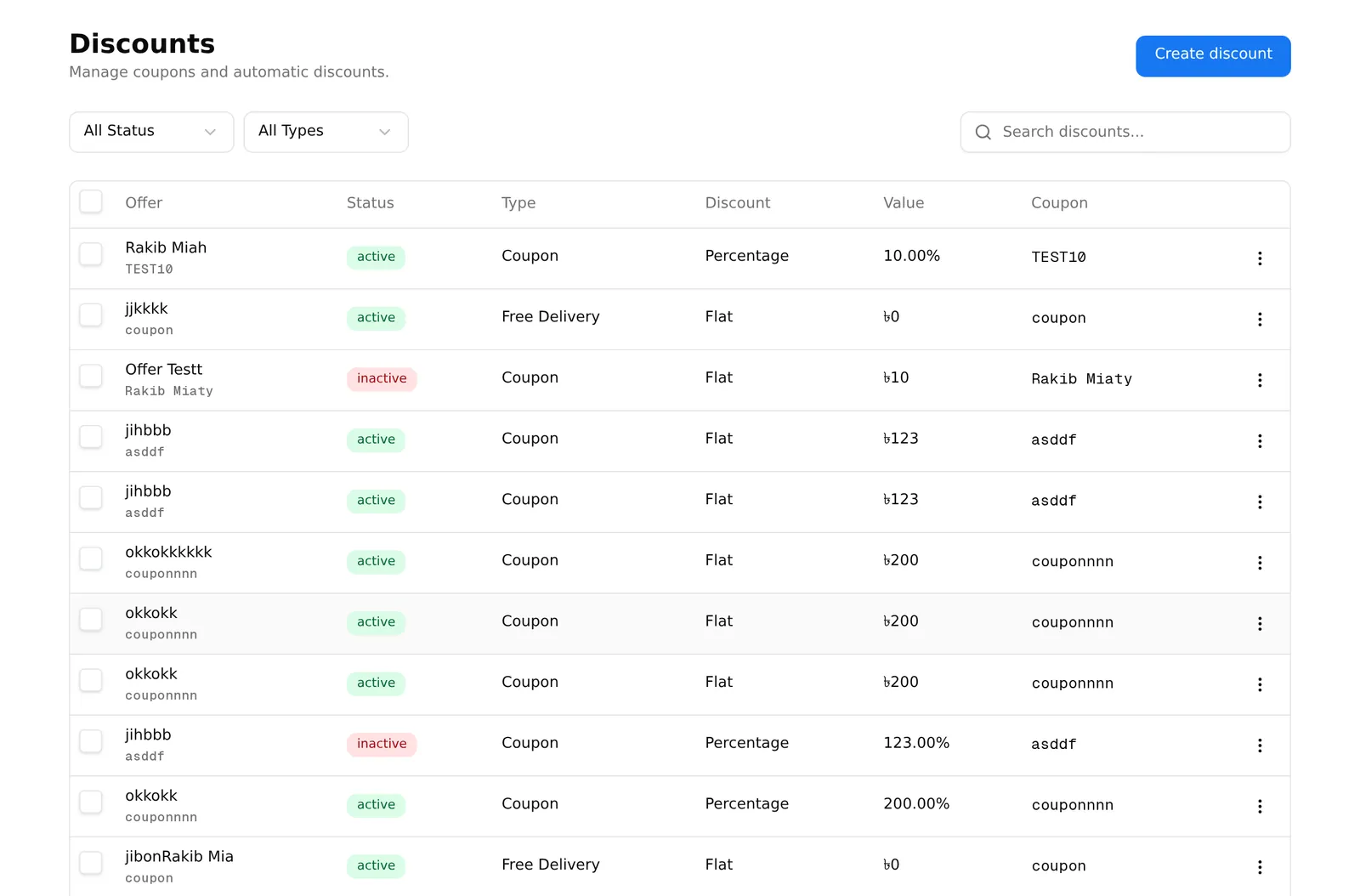
Create discount offers three kinds:
| Type | How the customer gets it |
|---|---|
| Coupon | They type a code at checkout |
| Discount | Applied automatically when the order qualifies |
| Free Delivery | Delivery charge drops to ৳0 |
The list shows the offer name, status, type, discount, value and coupon code. Filter by status (Active / Inactive) and type, or search by name.
The ⋯ menu has Edit, Activate / Deactivate and Delete. Ticking several rows gives you a Delete selected button.
Deactivate rather than delete a seasonal offer. Next Eid you can switch the same coupon back on instead of rebuilding it.
Free delivery takes priority over everything else. When a free delivery offer applies, the delivery charge is ৳0 and no other delivery rule is considered — see Delivery.
Plan note: every plan includes a maximum number of promotions. At the limit, creating one opens an upgrade message. See your plan.
Campaigns
Sidebar → Marketing → Campaigns is an introduction page, not the campaign list. Its Learn more and Browse marketing apps buttons do nothing — ignore them.
Create campaign is the button that works. It asks for:
- Campaign name
- Discount type — Percentage (%) or Fixed amount
- Discount value
- Start date and End date
- Banner — an image for the campaign
- Target products — which products it applies to, by search or by SKU list
Saving takes you to the campaign list. To find that list again later, go to Marketing → Overview and press “View all” on the Recent campaigns card — there is no sidebar link to it.
Campaign status is worked out from the dates: Scheduled before the start, Active during, Ended after. You do not switch them on and off yourself.
The marketing overview
Sidebar → Marketing → Overview shows total sales, total orders, average order value, sales and orders this month with a growth percentage, total customers and completed orders — plus your recent campaigns.
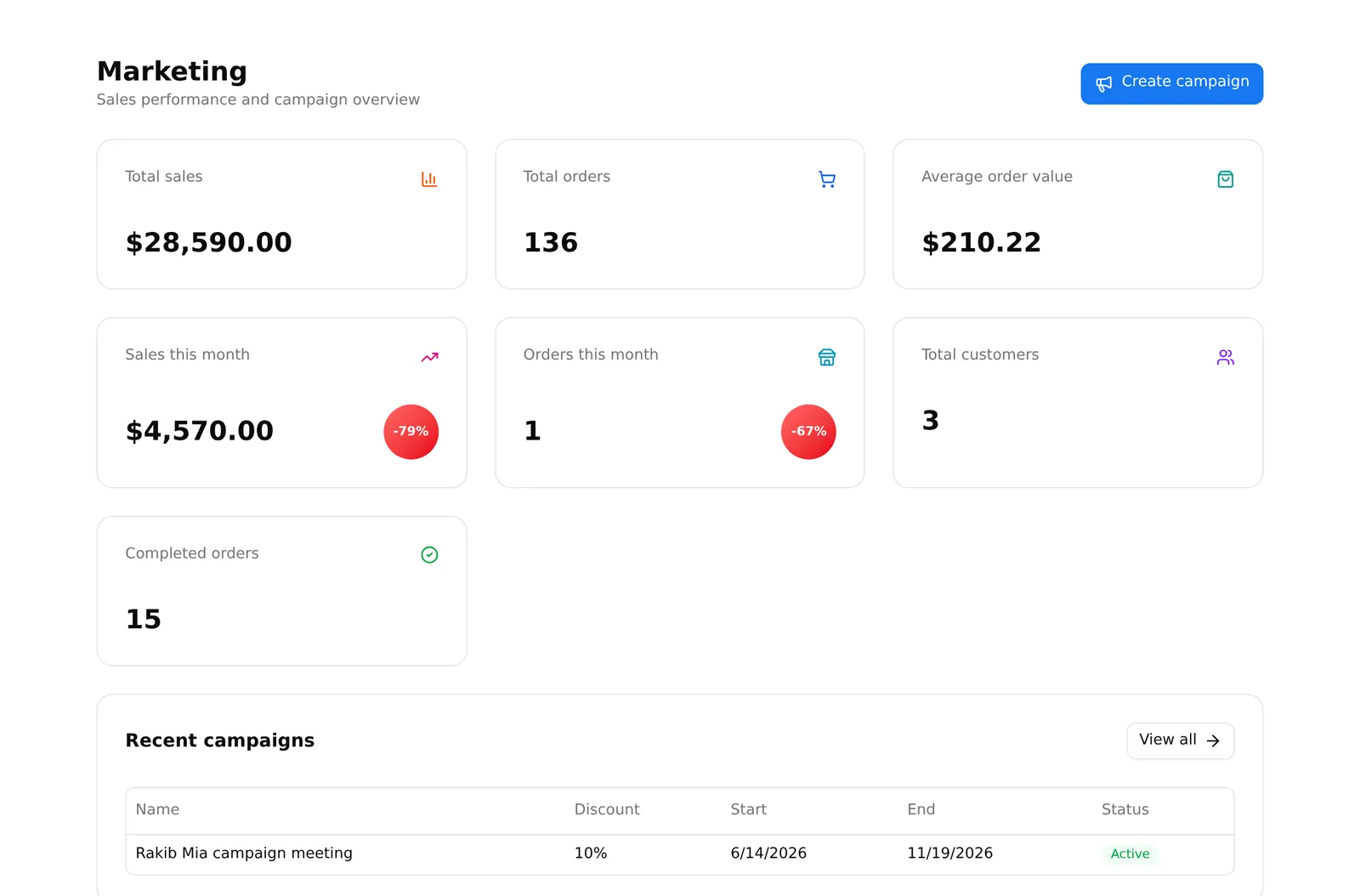
It is the fastest way to see whether this month is beating last month.
Advertising, tracking and chat apps
Each of these is a separate app that adds its own menu entry once installed. The tracking apps sit under Marketing → Ads & Tracking, the chat apps under Marketing → Customer Chat:
| Menu path | What it does |
|---|---|
| Ads & Tracking → Facebook | Facebook Pixel — measures ad results, builds audiences |
| Ads & Tracking → TikTok | TikTok Pixel |
| Ads & Tracking → Google Tags & Analytics | Google Analytics and Google Ads tracking |
| Ads & Tracking → Pinterest | Pinterest tag |
| Ads & Tracking → Microsoft Clarity | Free session recordings and heatmaps |
| Customer Chat → WhatsApp | A WhatsApp button on your storefront |
| Customer Chat → OmniConva | Opens the OmniConva app |
If one is missing from your sidebar, it is not installed — see Apps. When none of the tracking apps is installed, the whole Ads & Tracking group disappears.
Install the tracking for a platform before you spend money advertising on it. Without the pixel in place first, that spending cannot be measured afterwards — the data simply is not collected.
Microsoft Clarity is free and worth installing on day one. Watching real customers fail to find your checkout button teaches you more than any report.
Common problems
“My coupon does not work at checkout.” Check it is Active, that today is inside its date range, and that the order meets the minimum. Also check the usage limit — a coupon that has been used its maximum number of times stops working.
“Free delivery is applying when it should not.” Free delivery offers override all other delivery rules. Check the offer’s conditions.
“I cannot find my campaigns.” Marketing → Overview → View all.
“I hit my promotion limit.” Every plan caps promotions. See Billing.